
Assigning content to staff
As an administrator in PDNow, you have the ability to assign courses to your staff. You will do this from the administrator dashboard. To access the dashboard, click on the “Learning Dashboard” from the left side menu.
Video: Assign a course in PDNow
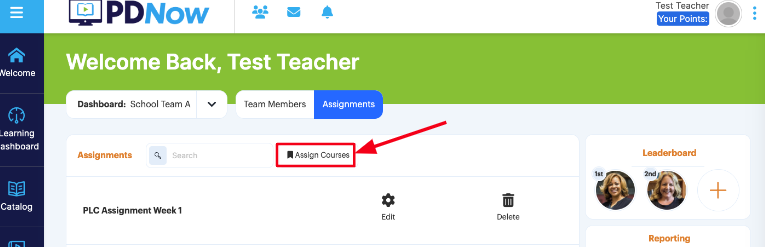
From the administrator dashboard, click on “Assignments” in the top-center of the screen.

From the assignments screen, click on “Assign Courses.”
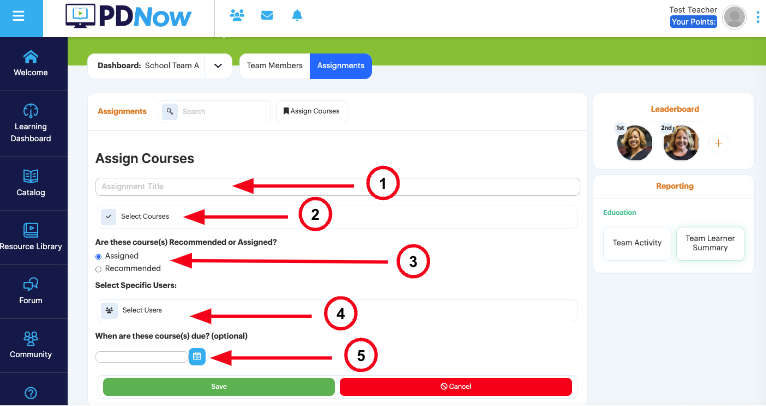
- Create a title for the assignment.
- Select the Course(s) assigned. You can select one or multiple here.
- Designate if the courses will be assigned (required) or recommended (optional).
- Select if this Course assignment will apply to specific users or user groups.
- Add a due date (optional).
- Click on the green “Save” button at the bottom of the screen.
Your staff will get a notification that courses have been assigned or recommended in their PDNow account. You can view their progress on any assignments by clicking on the Assignments tab from your Administrator Dashboard and then clicking on the assignment title. You can also edit or delete an assignment from this screen.
